
Why you should use Water Lock on your Apple Watch
You can easily screw yourself over if you don’t use the Water Lock feature on the Apple Watch.
Whether you are swimming or taking a shower, you need to turn it on or else your screen will do crazy things.
Water conducts electrons like our fingers and can register touches and gestures on the touch screen. If you’re in the shower, the overwhelming amount of water can cause unpredictable behavior on your watch.
I have had the following two scenarios happen to me because I forgot to turn on Water Lock when jumping in the shower:
My mail app was open, and the watch had swiped left on an email to delete it. I noticed it just in time, but I could have unknowingly lost an important email I couldn't’ afford to lose.
In a separate incident, I was getting out of the shower and I heard voices coming to me. I glanced at my watch and realized that I was on an active call with my mom who was trying to talk to figure out what the heck was going on!
Do yourself a favor, and turn on Water Lock before jumping in the shower. That way you won’t have to worry about your watch accidentally opening apps, calling people, or deleting your emails.
You can easily screw yourself over if you don’t use the Water Lock feature on the Apple Watch.
Whether you are swimming or taking a shower, you need to turn it on or else your screen will do crazy things.
Water conducts electrons like our fingers and can register touches and gestures on the touch screen. If you’re in the shower, the overwhelming amount of water can cause unpredictable behavior on your watch.
I have had the following two scenarios happen to me because I forgot to turn on Water Lock when jumping in the shower:
My mail app was open, and the watch had swiped left on an email to delete it. I noticed it just in time, but I could have unknowingly lost an important email I couldn't’ afford to lose.
In a separate incident, I was getting out of the shower and I heard voices coming to me. I glanced at my watch and realized that I was on an active call with my mom who was trying to talk to figure out what the heck was going on!
Do yourself a favor, and turn on Water Lock before jumping in the shower. That way you won’t have to worry about your watch accidentally opening apps, calling people, or deleting your emails.
Passwords App on iPhone and Mac - one huge security difference.
I was reading about Microsoft’s AI based Recall feature, and I thought to myself, what if that feature was on the Mac? Would sensitive information be blurred out when screenshots were automatically being captured?
I was reading about Microsoft’s AI based Recall feature, and I thought to myself, what if that feature was on the Mac? Would sensitive information be blurred out when screenshots were automatically being captured?
The most sensitive app on your iPhone, iPad, or Mac is the Passwords app, and if it were to be “screenshotted,” it should blur the passwords.
On iOS and iPadOS, the Passwords app blurs all passwords when you take a screenshot. Even if you want to display the password in large type, the whole screenshot is a giant white blank screen, which is awesome. Even if the password field is obscured with dots (•••••••••••), taking a screenshot makes that whole field completely blank so you don’t even know how long the password is.
Here are 4 screenshots on iOS, showing the completely blank password field:

Now compare that to what you actually see when you are in the Passwords app on iOS (or iPadOS):


In general, iOS and iPadOS do a great job of obscuring your password when taking a screenshot in their app.
On macOS, that is not the case.
I opened the Passwords app and started taking screenshots, and it faithfully captures everything your eyes can see:
If your password is hidden with dots, you will see the dots.
If you hover over your password revealing itself and then you take a screenshot, you will see the password.
If you choose the option to display the password in large type and then take a screenshot, you will see the password.
This is the complete opposite of iOS and iPadOS, and something Apple should address.
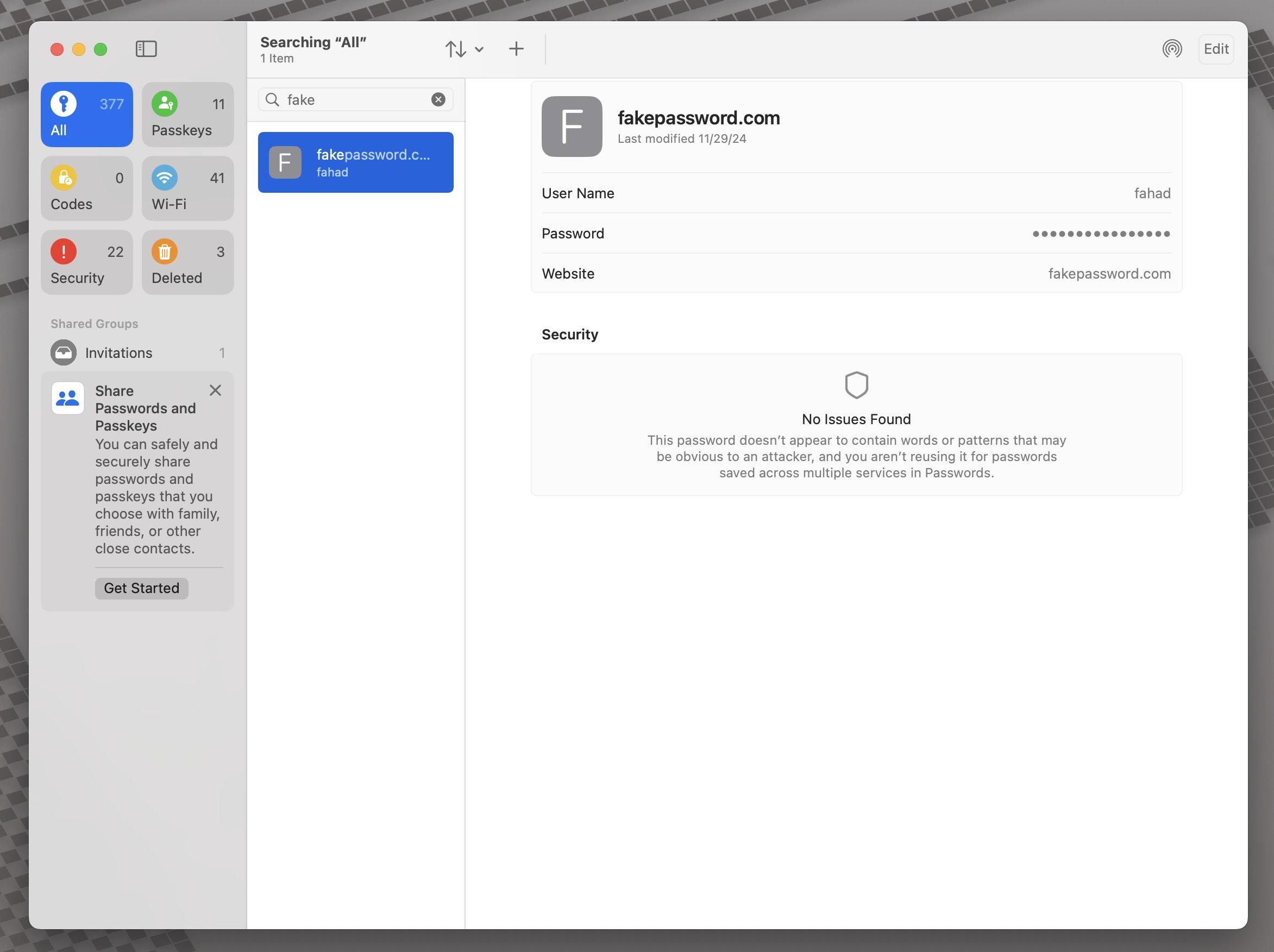
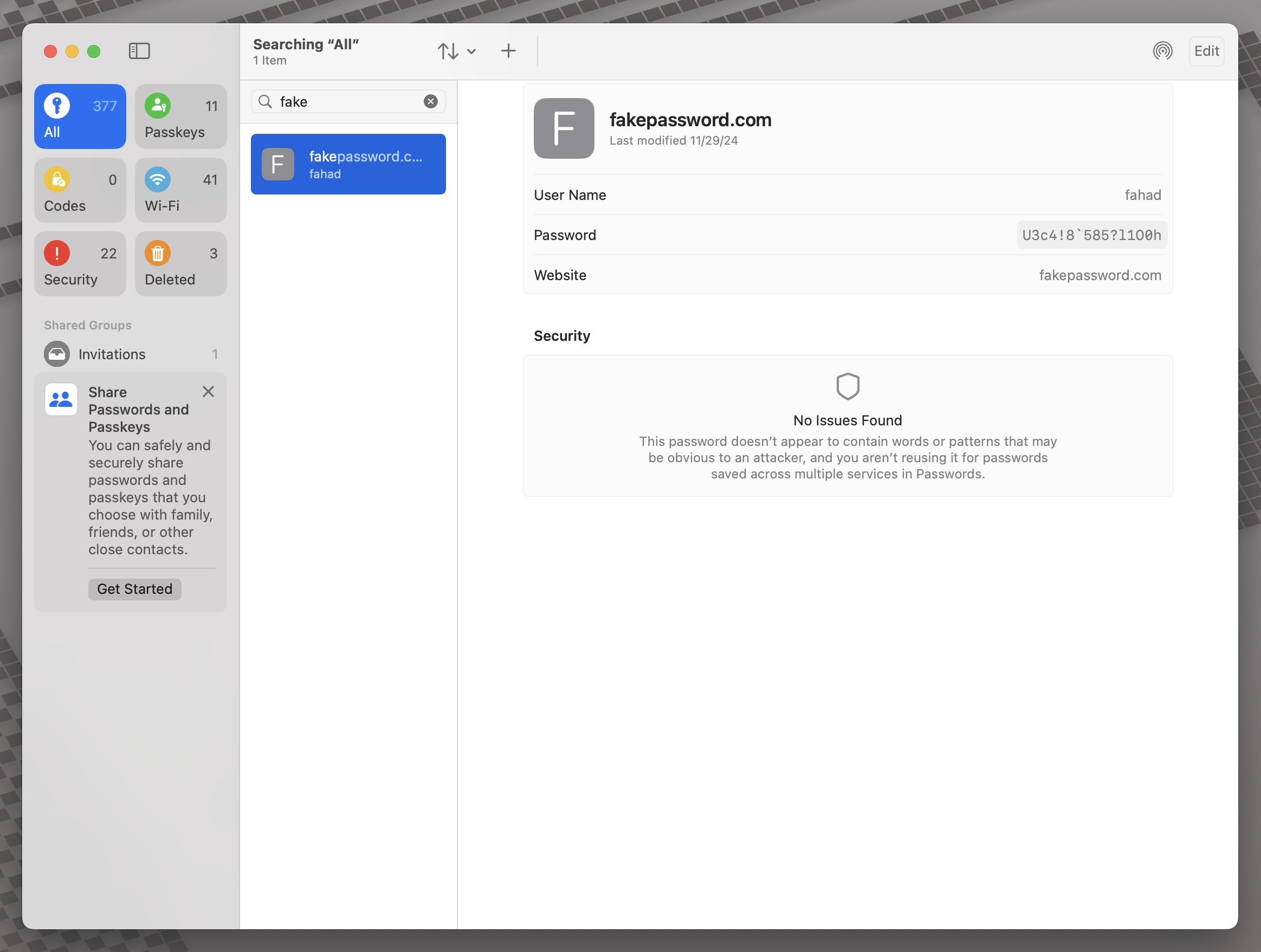
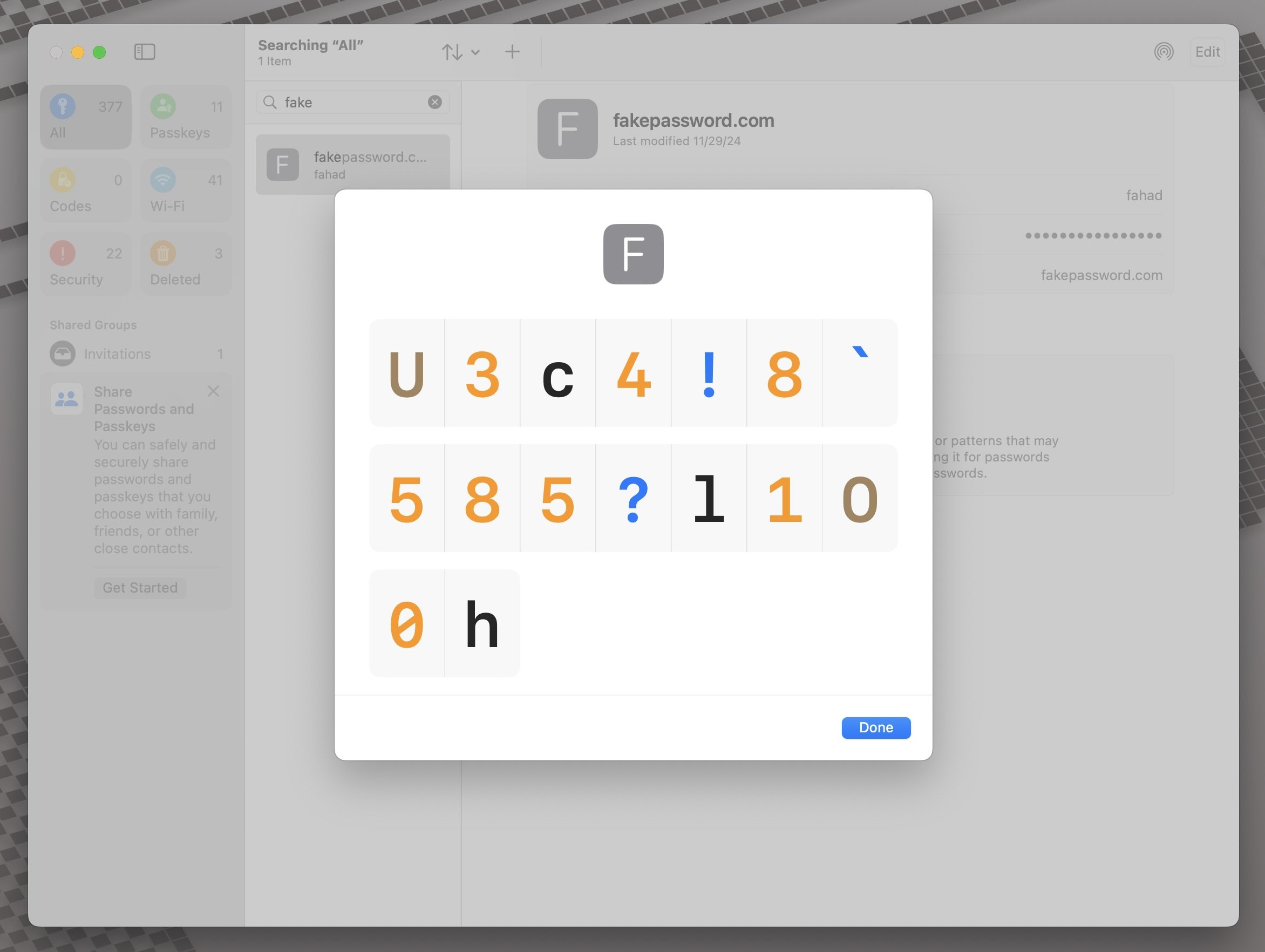
This might not be a security risk, but it can be in certain scenarios:
You save your screenshots to the cloud by default, making your passwords exposed to other individuals who might share the same iCloud folders as you.
You have multiple monitors and your passwords app is on your secondary (or tertiary) monitor. Many people don’t know or forget that when you take a screenshot, all of your monitors are being captured.
You have a custom mouse that has hotkeys for screenshotting, and you accidentally capture screenshots without your knowledge.
If this Recall feature was on macOS today, would you even want to open your Passwords app, knowing that the computer is taking screenshots in the background and capturing your sensitive information?
Imagine if your computer constantly was taking screenshots of your activity…
Not to worry, because Microsoft has a beta feature called Recall. Here is what it does in a nutshell:
If you opt in to the feature, then as you use your PC, a snapshot of your active screen will be saved every few seconds and when the content of your active window changes. Snapshots are also protected with Windows Hello, so that you are the only signed in user can access Recall content. Recall allows you to search for content, including both images and text, using the clues you remember. Trying to remember the name of the sustainable restaurant you saw last week? Just ask Recall and it retrieves both text and visual matches for your search, automatically sorted by how closely the results match your search. Recall can even jump back into the content you saw.
How safe is it?
To use Recall you need to opt in to saving snapshots, which are screenshots of your activity. Snapshots and the contextual information derived from them are saved and encrypted to your local hard drive. Recall does not share snapshots or associated data with Microsoft or third parties, nor is it shared between different Windows users on the same device. Windows will ask for your permission before saving snapshots. You are always in control, and you can delete snapshots, pause or turn them off at any time. Any future options for the user to share data will require fully informed explicit action by the user.
Do we really need our computer to constantly take screenshots of our online activity? Sounds overboard, even if the information is encrypted locally. I know that if Apple were to do something like this for the Mac, I would keep it disabled. Thankfully this feature is an opt-in feature for Windows users.
Since it is still in beta, there are still lots of security risks since Recall has trouble discerning sensitive websites and screenshots sensitive information.
Not to worry, because Microsoft has a beta feature called Recall. Here is what it does in a nutshell:
If you opt in to the feature, then as you use your PC, a snapshot of your active screen will be saved every few seconds and when the content of your active window changes. Snapshots are also protected with Windows Hello, so that you are the only signed in user can access Recall content. Recall allows you to search for content, including both images and text, using the clues you remember. Trying to remember the name of the sustainable restaurant you saw last week? Just ask Recall and it retrieves both text and visual matches for your search, automatically sorted by how closely the results match your search. Recall can even jump back into the content you saw.
How safe is it?
To use Recall you need to opt in to saving snapshots, which are screenshots of your activity. Snapshots and the contextual information derived from them are saved and encrypted to your local hard drive. Recall does not share snapshots or associated data with Microsoft or third parties, nor is it shared between different Windows users on the same device. Windows will ask for your permission before saving snapshots. You are always in control, and you can delete snapshots, pause or turn them off at any time. Any future options for the user to share data will require fully informed explicit action by the user.
Do we really need our computer to constantly take screenshots of our online activity? Sounds overboard, even if the information is encrypted locally. I know that if Apple were to do something like this for the Mac, I would keep it disabled. Thankfully this feature is an opt-in feature for Windows users.
Since it is still in beta, there are still lots of security risks since Recall has trouble discerning sensitive websites and screenshots sensitive information.
Apple sued for its privacy stance towards its employees.
Rushil Agrawal from Android Authority:
Apple, the tech giant that has built its reputation on safeguarding customer privacy, is now facing a lawsuit that claims its own employees aren’t getting the same treatment. Amar Bhakta, an employee in Apple’s advertising technology division, has accused the company of prying into workers’ personal lives through iCloud accounts and non-work devices.
The main issue here is the blending of personal and work iCloud accounts, and Apple “actively discouraging” the use of separate iCloud accounts:
The heart of the issue seems to be Apple’s policy of requiring employees to use Apple devices for work, which, combined with restrictions on company-owned devices, often leads employees to use their personal iPhones and Macs. This, in turn, necessitates the use of personal iCloud accounts, allegedly exposing personal data to company scrutiny.
For employees who’d rather not have their personal lives exposed, the alternative isn’t much better. The suit claims Apple “actively discourages” setting up separate iCloud accounts for work purposes, making it nearly impossible to avoid this blending of work and personal data.
Active discouragement of employees to use separate iCloud accounts for work will be what the case will revolve around.
Could just be a controlling manager, or something much bigger.
Not a good look for Apple.
Rushil Agrawal from Android Authority:
Apple, the tech giant that has built its reputation on safeguarding customer privacy, is now facing a lawsuit that claims its own employees aren’t getting the same treatment. Amar Bhakta, an employee in Apple’s advertising technology division, has accused the company of prying into workers’ personal lives through iCloud accounts and non-work devices.
The main issue here is the blending of personal and work iCloud accounts, and Apple “actively discouraging” the use of separate iCloud accounts:
The heart of the issue seems to be Apple’s policy of requiring employees to use Apple devices for work, which, combined with restrictions on company-owned devices, often leads employees to use their personal iPhones and Macs. This, in turn, necessitates the use of personal iCloud accounts, allegedly exposing personal data to company scrutiny.
For employees who’d rather not have their personal lives exposed, the alternative isn’t much better. The suit claims Apple “actively discourages” setting up separate iCloud accounts for work purposes, making it nearly impossible to avoid this blending of work and personal data.
Active discouragement of employees to use separate iCloud accounts for work will be what the case will revolve around.
Could just be a controlling manager, or something much bigger.
Not a good look for Apple.
People know your Wi-Fi password, and it can get you hacked.
With iOS 16 and later, Apple has made it a lot easier to find your Wi-Fi password and other Wi-Fi passwords that you have connected to.
With iOS 18, it’s way easier since you can do it from the Passwords app.
I didn’t even know you could look at a Wi-Fi password when someone shares it with you, until I looked at the Wi-Fi category in the Passwords app.
I went to a relative’s house recently who likes to keep a low profile, and they are always reluctant to share their Wi-Fi password. They don’t even keep bluetooth on, so they have to manually type their password into my phone or my kids’ devices whenever we come over.
Once he entered the password on my iPhone, I just went into the Passwords app, went under the Wi-Fi category, and voila! There was the password.
They were surprised to find out how I knew it, but it shows you why you need to make sure that password is not used anywhere else. A lot of people (around 78%) use the same password for multiple accounts, and if you’re using your Wi-Fi password for something else, now is a good time to change it.
With iOS 16 and later, Apple has made it a lot easier to find your Wi-Fi password and other Wi-Fi passwords that you have connected to.
With iOS 18, it’s way easier since you can do it from the Passwords app.
I didn’t even know you could look at a Wi-Fi password when someone shares it with you, until I looked at the Wi-Fi category in the Passwords app.
I went to a relative’s house recently who likes to keep a low profile, and they are always reluctant to share their Wi-Fi password. They don’t even keep bluetooth on, so they have to manually type their password into my phone or my kids’ devices whenever we come over.
Once he entered the password on my iPhone, I just went into the Passwords app, went under the Wi-Fi category, and voila! There was the password.
They were surprised to find out how I knew it, but it shows you why you need to make sure that password is not used anywhere else. A lot of people (around 78%) use the same password for multiple accounts, and if you’re using your Wi-Fi password for something else, now is a good time to change it.
Are RCS messages encrypted?
The short answer is no, but the devil is in the details.
With iOS 18, Apple has introduced RCS messages, which is a new industry standard in messaging that allows you to send high quality videos and photos instead of those abysmally low-resolution photos and videos you currently send to your fellow Android users.
RCS also supports delivery and read message receipts just like iMessage.
In a nutshell, it makes your interaction with non-iPhone users more like iMessage, while still keeping the green bubble.
Not all carriers support RCS, but remember one thing.
One very important thing.
RCS is not end-to-end encrypted.
According to Apple’s site:
Apple’s implementation of RCS is based on the industry’s standard. RCS messages aren’t end-to-end encrypted, which means they're not protected from a third-party reading them while they're sent between devices.
Besides the messages themselves, What other sensitive information about you can be transmitted when using RCS?
More than you think:
User identifiers are exchanged for your carrier and their partners to authenticate your device and provide a connection. These identifiers could include but are not limited to your IMEI, IMSI, current IP address, and phone number. Your current IP address might also be shared with other RCS users.
It’s funny how all the news around RCS focuses on high end photo and video transmission, but no one emphasizes that it is just as insecure as regular SMS/MMS.
If you really want to have secure group chats that allow high quality images and videos, stick with a more secure platform such as WhatsApp.
Or better yet, you could just convince your friends to get an iPhone and use iMessage, which is end-to-end encrypted.
The short answer is no, but the devil is in the details.
With iOS 18, Apple has introduced RCS messages, which is a new industry standard in messaging that allows you to send high quality videos and photos instead of those abysmally low-resolution photos and videos you currently send to your fellow Android users.
RCS also supports delivery and read message receipts just like iMessage.
In a nutshell, it makes your interaction with non-iPhone users more like iMessage, while still keeping the green bubble.
Not all carriers support RCS, but remember one thing.
One very important thing.
RCS is not end-to-end encrypted.
According to Apple’s site:
Apple’s implementation of RCS is based on the industry’s standard. RCS messages aren’t end-to-end encrypted, which means they're not protected from a third-party reading them while they're sent between devices.
Besides the messages themselves, What other sensitive information about you can be transmitted when using RCS?
More than you think:
User identifiers are exchanged for your carrier and their partners to authenticate your device and provide a connection. These identifiers could include but are not limited to your IMEI, IMSI, current IP address, and phone number. Your current IP address might also be shared with other RCS users.
It’s funny how all the news around RCS focuses on high end photo and video transmission, but no one emphasizes that it is just as insecure as regular SMS/MMS.
If you really want to have secure group chats that allow high quality images and videos, stick with a more secure platform such as WhatsApp.
Or better yet, you could just convince your friends to get an iPhone and use iMessage, which is end-to-end encrypted.