
Will Apple make another Ceramic Apple Watch?
Apple Watch Series 5, released in September 2019, was the last time Apple made a Ceramic Edition watch, and it will probably be their last as they push towards Apple 2030. Most of the minerals used in ceramics need to be mined, which goes against Apple’s environmental goals:
Recycled and renewable materials often have a lower carbon footprint than mined materials. By sourcing more recycled and renewable content, we aim to one day end our reliance on mining.
It also requires a lot of energy to make the casing for the Ceramic Apple Watch as stated in their booklet when you purchased one in the past. Details straight out of the Series 3 Ceramic Edition booklet:
Apple's advanced material development team created a custom ceramic powder made from zirconia, yttrium oxide, and alumina. This combination gives the ceramic its unique color and ensures that it maintains its beauty and strength.
To create the blank from which the case will be machined, the ceramic powder blend is mixed with a binder and formed in a precision-engineered compression mold.
After the blank is machined into the case form, it is sintered at 1500 degrees Celsius for 35 hours. This isotropically reduces its size by 20 percent.
More than 70 diamond-grit CNC cutters machine every Apple Watch Edition case—a process that takes up to six hours. Each case then undergoes two hours of polishing to increase strength and achieve its characteristic depth and lustre.
If you were to ask me, the sintering process, where the powder is transformed into a hard, durable, solid, is the deal-breaking process that put the kibosh on Ceramic Apple Watches, at least from an environmental perspective. I’m sure it also had something to do with sales numbers since $1,299 for an Apple Watch that has the same software and performance as the $399 watch is ludicrous. At least with Apple Watch Hermès, you are buying a reputable brand that demands a high price tag.
Aluminum is very recyclable and Apple has increased the efficiency of making Titanium Apple Watches with 3D printing, so I wouldn’t hope for a Ceramic comeback. In the meantime, see for yourself if you think getting a used Series 5 Ceramic Edition is worth it.
Apple Watch Series 5, released in September 2019, was the last time Apple made a Ceramic Edition watch, and it will probably be their last as they push towards Apple 2030. Most of the minerals used in ceramics need to be mined, which goes against Apple’s environmental goals:
Recycled and renewable materials often have a lower carbon footprint than mined materials. By sourcing more recycled and renewable content, we aim to one day end our reliance on mining.
It also requires a lot of energy to make the casing for the Ceramic Apple Watch as stated in their booklet when you purchased one in the past. Details straight out of the Series 3 Ceramic Edition booklet:
Apple's advanced material development team created a custom ceramic powder made from zirconia, yttrium oxide, and alumina. This combination gives the ceramic its unique color and ensures that it maintains its beauty and strength.
To create the blank from which the case will be machined, the ceramic powder blend is mixed with a binder and formed in a precision-engineered compression mold.
After the blank is machined into the case form, it is sintered at 1500 degrees Celsius for 35 hours. This isotropically reduces its size by 20 percent.
More than 70 diamond-grit CNC cutters machine every Apple Watch Edition case—a process that takes up to six hours. Each case then undergoes two hours of polishing to increase strength and achieve its characteristic depth and lustre.
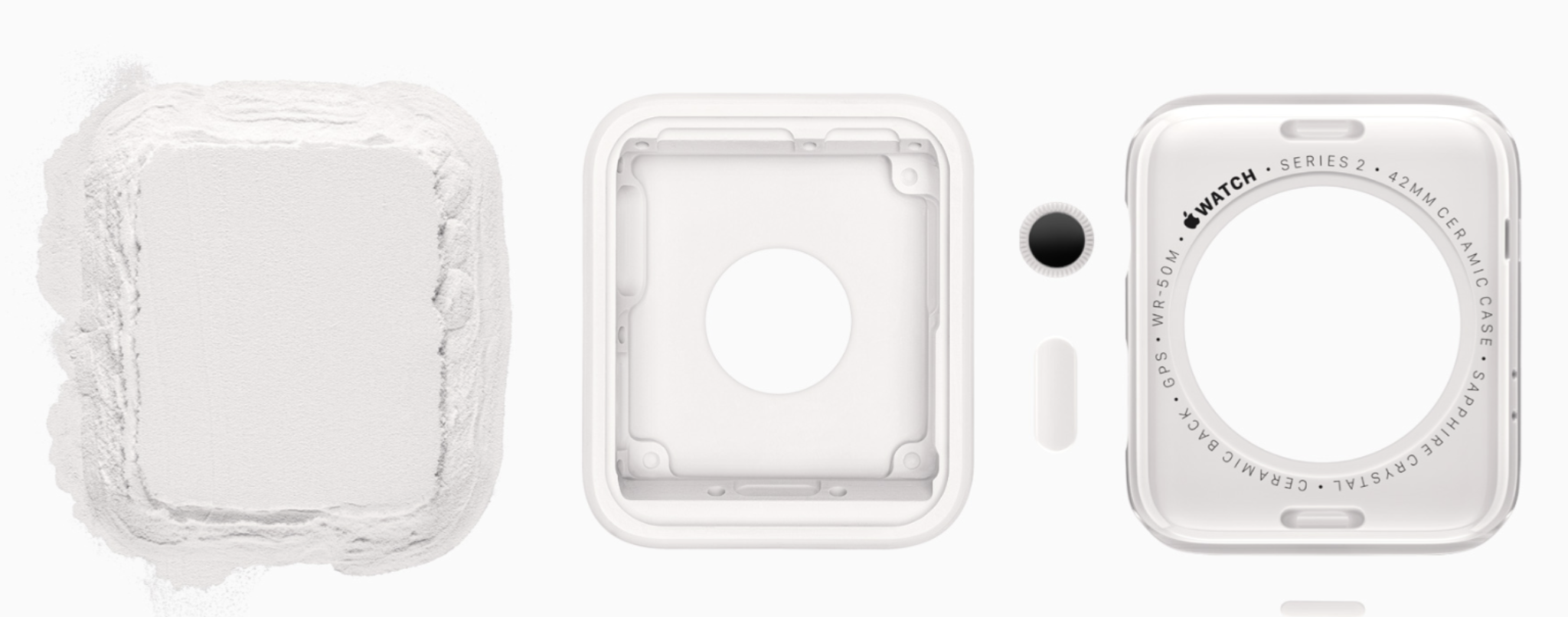
Image source: BasicAppleGuy
If you were to ask me, the sintering process, where the powder is transformed into a hard, durable, solid, is the deal-breaking process that put the kibosh on Ceramic Apple Watches, at least from an environmental perspective. I’m sure it also had something to do with sales numbers since $1,299 for an Apple Watch that has the same software and performance as the $399 watch is ludicrous. At least with Apple Watch Hermès, you are buying a reputable brand that demands a high price tag.
Aluminum is very recyclable and Apple has increased the efficiency of making Titanium Apple Watches with 3D printing, so I wouldn’t hope for a Ceramic comeback. In the meantime, see for yourself if you think getting a used Series 5 Ceramic Edition is worth it.
Apple Watch Series 5 Ceramic Edition - is it worth buying in 2026? Full hands-on.
There’s only one 6 year old Apple Watch worth buying, and even then it’s only for the die-hard Apple fan:
Apple Watch Edition, Series 5 Ceramic. 📓
Update 3/11/26 - added some Neon Yellow Sport Band photos, and updated the performance section in regards to widgets in Smart Stack.
There’s only one 6 year old Apple Watch worth buying, and even then it’s only for the die-hard Apple fan:
Apple Watch Edition, Series 5 Ceramic.
It came in two sizes, 40mm and 44mm, equivalent to today’s Apple Watch SE 3. If you’re OK with the thicker bezels on the SE 3, you’ll be fine with a Series 5. I’ve been using mine over the past few days, and it still holds up really well today - much better than the Series 3. Of course, the Ceramic Edition has some perks, with the main one being the premium pearly white finish that is smooth and scratch resistant. You get the bonus of a sapphire display which is also scratch resistant.
It better be sapphire when you consider this bad boy was $1,299 at launch.

Ceramic Edition Series 3 and Series 5.
Fun fact: the larger Series 3 case (left) has a slightly smaller screen than the smaller sized Series 5.
The downside - both ceramic and sapphire are more shatter prone, so you don’t want to daily this watch or use it for workouts since replacement units can cost up to $800. If your battery has less than 80% health, it is worth the additional $99 to get it replaced since more than likely, Apple will simply swap out the device, giving you a new watch for an additional $99. Hurry up though, because the Series 5 is now vintage. Apple’s definition of vintage per Apple:
Products are considered vintage when Apple stopped distributing them for sale more than 5 and less than 7 years ago. […]
Owners of iPhone, iPad, iPod, Mac, Apple TV, Apple Watch, AirPods, Apple Vision Pro, and Beats products may obtain service and parts from Apple service providers for a minimum of 5 years from when Apple last distributed the product for sale.
Service and parts may be obtained for longer, as required by law or for up to 7 years, subject to parts availability.
In less than two years (if not sooner), the Series 5 will become obsolete, ceasing all repairs and service.
If you’re still interested, I’ve done some testing to see if it’s worth it for you.
Initial boot up
Once again I did a boot up test to see how quickly it can ping my iPhone Air. With this test you get a feel for how quickly the watch connects to the phone. From the Apple logo boot up screen to a successful phone ping I got the following times:
Series 3 - 8 minutes, 50 seconds
Series 5 - 1 minute, 53 seconds (1st attempt)
Series 5 - 2 minutes, 27 seconds (2nd attempt)
Series 5 - 2 minutes, 27 seconds (3rd attempt)
Ultra 3 - 1 minute and 6 seconds
2.5 minutes is perfectly acceptable for a 6 year old watch, especially compared to the extremely sluggish Series 3.
Size comparison
When you compare the Series 5 to any modern Apple Watch of the same size, the size is very similar, and almost unnoticeable to the naked eye. It’s when you get to full-screen watch faces that you notice the bigger bezels. Not a huge deal if you ask me, especially if you use darker watch faces.

Each small Apple Watch generation body style. Left to right: 38mm Series 2, 40mm Series 5 Ceramic, 41mm Series 9, 42mm Series 10. The Series 5 display is smaller, but not by much.

The Series 3 bezels are ancient (far left), making the Series 5 (2nd from left) more acceptable. The Series 10 (far right) looks like it has a bigger bezel than the Series 9 to its left, but it’s actually more complicated.
What bands look best on the Ceramic body?
The great news is most bands look amazing on the white ceramic body, the only exception being silver bands. It’s not ugly, but it definitely has a retro Nike type of vibe.

It kinda works if you really try hard.

Not a fan of this look though.

This look…this works…this works well.
Honestly, any band from Apple that doesn’t have silver lugs looks amazing with Ceramic. Sorry Grand H owners.
I have a plethora of sport bands but none that are punchy except for my purple band, making the watch more spunky and fun. Lighter colors give it a more adventurous look, while darker colors scream business casual. The ultimate flex is the black link bracelet, giving you that nice contrast at the upper echelon of business casual, leading to big merger acquisitions on the golf course.

Spunky.

Business casual.

Vacation.

Vacation from your vacation.

Bruce Wayne on the golf course.
Hardware
If you want to know the look and feel of the Series 5, look no further than the new Apple Watch SE 3. It has the same exterior hardware when it comes to screen size and dimensions. The one difference? I’ll pull up what I said about the Series 3 Ceramic Edition since it applies here:
The Ceramic models have a distinct lip or “shelf” between the display and the body, resulting in a break in the fluid feeling when you slide your finger off the screen and onto the body. This was a limitation of the Ceramic manufacturing process because even the entry-level aluminum and mid-tier stainless steel models had the seamless feel and look between screen and body. As beautiful as the Ceramic Edition is, it’s a shame they couldn’t make it as seamless considering the original $1,299 price tag.

Series 3 Ceramic’s bigger shelf vs the more flush display on the aluminum Series 3.

Series 5 Ceramic maintains the bigger shelf vs the Series 5 Stainless Steel. Both displays are Sapphire, so the only variation here is the body.
Battery
The Series 5 was the first Apple Watch to feature an Always On Display (AOD), making it a game changer for many. I tested the battery with the AOD on the smaller 40mm size, and got pretty good results. I have a replacement watch from Apple so I also had 100% battery health.
Day 1 - 100% at 9AM…24% at 10:15PM
Day 2 - 94% at 7:26am…8% at 10:39PM
You can easily get a full day, but you will have to strategically charge the watch if you like sleep tracking, which this watch supports. I say strategically because the Series 5 does not support fast charging. Going back to sleep tracking, it’s nowhere near as robust as more modern watches, and you won’t get sleep apnea notifications nor a sleep score if that’s your thing. Expect a solid day of battery life for casual use, and 24 hours (or more) on Low Power Mode, with even better numbers if you’re going for 44mm.
Performance
I was surprised by the performance considering this watch is over 6 years old. I never noticed any lag or hiccups during my casual daily use, mainly replying to messages or using voice activated Siri to turn on and off lights. If you’re a power user, you might run into some slowdowns, especially if you use cellular or On-device Siri frequently. Sorry, no 5G here.
The Series 5 ended software updates with watchOS 10 as its last major release, so you do get the same controls as current Apple Watches, without the hiccups and slowdowns of Liquid Glass on watchOS 26. Some of my favorite features on watchOS 10 are still supported:
Configuring a specific watch face with specific Focus Modes.
HomeKit compatibility.
ECG and heart rate notifications.
Fall detection.
Menstrual cycle tracking (for the ladies of course).
Auto workout detection - I was standing up and patting my baby girl’s back, and the watch thought I was starting an elliptical workout.
Here’s a full feature list comparing it with the SE3 and Series 11.
Update: 3/11/26 - the Series 5 supports 6 widgets in Smart Stack compared to 10 widgets in newer watches. Still plenty of widgets for most people. Just make sure you know what constitutes as a widget.
Unique quirks
Besides being the last generation of Ceramic Apple Watches, the only other quirk you will notice is some older watch faces that were removed with future updates. Of course that also means you won’t have many of the newer watch faces. I ain’t going to lie though - most of these now extinct watch faces are not worth bringing out the pitchforks for, except for the Explorer watch face, and maybe Numerals.

Explorer was a Jony Ive favorite…

That pollen colored band 😮💨. Source: Hodinkee

At least with Numerals, you can tell what hour it is without having to guess.
How much do they cost today?
The market is highly varied online, with eBay being your main source to purchase one. People are asking anywhere from $300-$2,000 depending on size, condition, battery health, and other accessories that are bundled together.
The best strategy - buy one for cheap with a battery health lower than 80%, and take it to Apple to get the battery replaced for $99. You’ll most likely end up with a brand new watch with a new battery from my personal experience and also from others on reddit. I was fortunate enough to get a free replacement, which I explained in detail.
Who should buy the Series 5 Ceramic Edition?
You know who you are if you’re trying to get a Ceramic Series 5. You can get an infinitely better Apple Watch by buying an SE 3, but that’s not what you’re here for.
You want the Ceramic finish.
You want the luxurious feel.
You want a different look on your wrist.
If you’re that type of enthusiast, you won’t regret it. It’s a weekend watch, and if you get one with good battery health, it can still last you for another 5 years.
How I got a free replacement for my Series 5 Ceramic Apple Watch.
The closest Apple Store to me was an hour away, so I made the next logical move:
Fly cross-country to Cupertino myself to get this resolved. 📓
Initially purchased on eBay, I was ecstatic to get a Series 5 Ceramic Apple Watch for around $350. It was the smaller 40mm variant which was fine since that’s my preferred size and I have invested in too many small bands.
After a few days, I noticed something that wasn’t noticeable from online photos: a greenish tint on the display. It was very obvious and disappointing at the same time. The display was never repaired or replaced per the seller (I believe him) and it was just a bad example. I compared it to my wife’s sapphire display on her Series 5 stainless steel.
A true apples to apples comparison in more ways than one.
The photos speak for themselves.

Wife’s stainless steel (left) vs green tinted Ceramic (right).

That premium look just isn’t there with the greenish display.

I double checked the “edit color” screen, and these were both the same color.
I was able to call Apple Support, and I explained the situation. I didn’t want to spend $800 for a repair, since it’s really a manufacturing defect. Once again, the OLED display should not look this bad after a few years especially when my wife’s display is equally old. Even my Series 3 display looked amazing by comparison. I was able to convince the Apple rep that it shouldn’t cost me the “other damage” price of $800 since it’s not really damaged by the user. I got quoted a much lower and reasonable price ($150). My goal was not to get a free repair because I know the watch is out of warranty and I just wanted to pay a fair price for what was most likely a manufacturing defect. Plus, this way Apple at least makes some money instead of nothing because I don’t think anyone will pay $800.
When I submitted the watch for repair, I got it back with a standard repair note that (roughly) said, “we didn’t find anything wrong with the watch.” I had a feeling this would happen. I called Apple again and we went through diagnostics, resetting the watch from scratch, and unsurprisingly the display had the same issue. Now I was getting quoted $849 (probably included tax and shipping), but I told him about my initial $150 quote. He said to take it into an Apple Store and have the technicians look at it and they can better estimate a cost to repair.
The closest Apple Store to me was an hour away, so I made the next logical move:
Fly cross-country to Cupertino myself to get this resolved.
My brother was there attending to some business, so I visited him and made an experience out of it, of course visiting the Apple Park Visitor Center as a side quest. Maybe going to an Apple Store in Cali would resolve the issue faster especially when they can see both watches side by side?
When I did show the Genius both watches, he immediately saw the difference and started tapping away documenting everything on his iPad. After he was done, he said I had to call Apple to get the process resolved since they have “special access” that in-store employees don’t have to submit a replacement. I went back to the Airbnb and called Apple, trying to be a bit more aggressive yet also not trying to be a douchebag.
Now they instructed me to go back to the store and have them send it out for repair. Finally, we’re getting somewhere (or so I thought). This is where my second mini side-quest took place.
A few weeks later back home, I got the watch back, and it was the same watch with no display replacement, with the same, “we found nothing wrong” note. I called again and was frustrated because no one was acknowledging the issue, even though it was proven with photos and shown to an Apple rep. Finally this Apple rep on the phone gave me some UPS instructions that sounded extremely shady, but at this point I had nothing to lose (besides the watch!).
I go to UPS and give the guy the Ceramic watch, and only the Ceramic watch. These were the instructions from the Apple rep. He put it in a baggie, wrapped it up, slapped three separate labels on the package, and off it went. A week later, I got a legitimate replacement watch this time, with no green screen tint, at no cost to me, (minus a few hours of phone time).
I wasn’t trying to get a free replacement, but they probably hooked me up because of all the rigamarole I had to go through. The new display speaks for itself:

At first glance, the new Ceramic (left) has the same color temperature as my wife’s even though the ambient sensor isn’t picking up the light in the room…

and it’s barely noticeable in this photo, but when you go off-axis…

my wife’s display (right) looks green now compared to my “new” Ceramic??
What is up with the off-axis green screen tinting?
Rating all three displays, I would say my first ceramic was definitely the worst, my wife’s stainless steel is 2nd, and my new replacement is top-tier. I would consider this variation based on three factors:
A normal variance where Apple gets displays from different suppliers who have a range of tolerances, even for color temperature. I’ve seen this on modern iPhones that shift color temperature off-axis. The problem is when it is just stupidly green, like my first Ceramic watch (1st photo in this article).
It could be due to the display being six years old, and on OLED displays, blue pixels do degrade faster than green and red pixels, causing a greenish tint.
One of the suppliers for this display, Japan Display Inc., was new to OLED technology, potentially having inferior OLED longevity compared to LG or Samsung.
Dear Apple: It’s turmeric, not tumeric
I will not acquiesce to such deviance. Turmeric is a miracle spice that deserves respect and has a right to be spelled with dignity. I typed “tumeric” in Docs, Pages, and even on Squarespace, and sure enough, it was flagged as a misspelled word.
I will not acquiesce to such deviance. Turmeric is a miracle spice that deserves respect and has a right to be spelled with dignity. I typed “tumeric” in Docs, Pages, and even on Squarespace, and sure enough, it was flagged as a misspelled word.
Five “Fahadx” observations I made when at the hospital.
Baby girl got sick again this past week, making a total of 8 days at the hospital over a one month period. A few observations I noticed:
Almost every healthcare worker wears an Apple Watch.
This particular Modular Compact configuration with no bottom widget is more common than I would like.
The chapel is occupied by Muslims 99% of the time.
Sushi is great, and cheap. You can literally park at the hospital and get cheaper sushi at the cafeteria than the grocery store.
Masimo blood oxygen sensors are a real thing. A wrap-around for the foot, using the big toe as the sensing point. Thank you Masimo - now please (Apple and Masimo), make a deal and give us proper Apple Watch blood oxygen capability.
Baby girl got sick again this past week, making a total of 8 days at the hospital over a one month period. A few observations I noticed:
Almost every healthcare worker wears an Apple Watch.
This particular Modular Compact configuration with no bottom widget is more common than I would like.
The chapel is occupied by Muslims 99% of the time.
Sushi is great, and cheap. You can literally park at the hospital and get cheaper sushi at the cafeteria than the grocery store.
Masimo blood oxygen sensors are a real thing. A wrap-around for the foot, using the big toe as the sensing point. Thank you Masimo - now please (Apple and Masimo), make a deal and give us proper Apple Watch blood oxygen capability.
The best watch band for your new Space Gray Apple Watch Series 11.
The new Space Gray color on the Series 11 is not as exciting as Jet Black was when announced for the Series 10, but the subtle gray does have nostalgic iPhone 5S and SE vibes. The perfect band to pair with it is undoubtedly the Black Titanium Milanese Loop. You will have to purchase the larger 46mm size for band compatibility. Both the band and the watch have a brushed finish, and the contrast between the two works well.
I know it’s a $199 dollar band for a $429 watch (crazy deal on Amazon right now for $329!), but the band will outlast the watch and really looks good.
Make sure you pick the right size for your wrist. (pics inside)
The new Space Gray color on the Series 11 is not as exciting as Jet Black was when announced for the Series 10, but the subtle gray does have nostalgic iPhone 5S and SE vibes. The perfect band to pair with it is undoubtedly the Black Titanium Milanese Loop. You will have to purchase the larger 46mm size for band compatibility. Both the band and the watch have a brushed finish, and the contrast between the two works well.
I know it’s a $199 dollar band for a $429 watch (crazy deal on Amazon right now for $329!), but the band will outlast the watch and really looks good.
Make sure you pick the right size for your wrist.


Smart Stack on Apple Watch - how many widgets can you really have?
The tricky thing is determining what actually is a widget, because you would think each rectangular block is a widget..📓
Assuming you turned off widget suggestions, you can have up to 10 widgets on the Series 9, 10, and Apple Watch Ultra 3. I’m assuming you can also have 10 widgets on the Ultra 2 and Series 11, which I don’t have for testing but they all use the same processor. On my much older Series 5, you can have 6 widgets.
The tricky thing is determining what actually is a widget, because you would think each rectangular block is a widget, but if you use the rectangular block with 3 circle widgets, each circle counts towards your total widget count. So on my Ultra 3 for example, I can have 7 widgets, and an 8th widget that holds the 3 circle widgets (total of 10). You can have only 1 or 2 circle widgets if you like, and add more full-sized widgets totaling 10.
Bottom line - you can’t treat the 3 circle widgets that occupies the space of one widget as one widget. They count as 3 separate widgets.

That would be one widget, two widgets, and three widgets Sire.
Bonus calendar widget in Smart Stack is back.
Apple added it, took it away, and now brought it back again:
New quality of life update - you can click on the date in Smart Stack to enter your calendar. Now you can free up a widget if you had a dedicated “Your Schedule” widget set up.
You can also click on the time to go back to your watch face.
I’m currently running watchOS 26.2 Developer Beta.
Apple added it, took it away, and now brought it back again:
New quality of life update - you can click on the date in Smart Stack to enter your calendar. Now you can free up a widget if you had a dedicated “Your Schedule” widget set up.
You can also click on the time to go back to your watch face.
I’m currently running watchOS 26.2 Developer Beta.
Apple needs to squash this 3-year old bug in watchOS 27.
Mark Gurman in his latest Power On Newsletter:
After the sweeping design overhaul of iOS 26 and the debut of Liquid Glass across its platforms, Apple is working on a Snow Leopard-style update. For iOS 27 and next year’s other major operating system updates — including macOS 27 — the company is focused on improving the software’s quality and underlying performance. […]
Aiming to improve the software, engineering teams are now combing through Apple’s operating systems, hunting for bloat to cut, bugs to eliminate, and any opportunity to meaningfully boost performance and overall quality.
watchOS 27 wasn’t mentioned by name and doesn’t have the brunt of software complaints, but don’t worry, I’m here to speak up for the silent majority.
watchOS 27 has a few bugs here and there, but nothing major. However, there is one feature that is still broken, and calling it a bug is being kind.
You can call it a minor infestation.
What am I talking about? I’m talking about, once again, the hidden toggle that is “Swipe to Switch Watch Face.” This mess started with watchOS 10 and its retooling of all the buttons and swipes.
I’ve tooted my horn about this several times in the past, but attention to detail is what makes Apple, Apple. When I’m swiping between watch faces, literally right now, with my Apple Watch Ultra 3, the best Apple Watch on the market, it still feels clunky and looks bad when compared to a Series 3 Apple Watch, a watch that has mastered the swipe between watch faces even though it crawls at a snails pace in every other function.
In fact, watchOS 26 has worse animations than my Series 10 on watchOS 11. At least the complications didn’t disappear and reappear like they do on watchOS 26.
Take a look for yourself:
Series 3 on watchOS 8 - notice the smooth transitioning of the seconds hand when swiping between analog faces, and how the time is always correct.
Series 10 on watchOS 11 - each swipe has to load the time and complications from scratch, but complications don’t disappear and reappear.
Ultra 3 on watchOS 26 - even worse than watchOS 11, with complications disappearing and reappearing.
Swiping to switch the watch face was a core feature from the beginning of Apple Watch, and even though swiping between watch faces is a transitionary software feature that doesn’t need to be reinvented, it does need to be fixed. Liquid Glass is proof that Apple does care about these small details - they literally reinvented every transition with Liquid Glass.
Apple Watch had a great run under their now-retired COO Jeff Williams, but I think he had too much on his plate, putting these optimizations on the back burner.
In addition to serving as Apple’s COO, Williams had also been overseeing the company’s customer service and support, the design team, software and hardware engineering for the Apple Watch, and Apple’s overall health initiatives.
Recently, Bloomberg reported that some of Williams’ responsibilities would be split, with the health and fitness teams reporting to Apple’s Senior Vice President of Services Eddy Cue, watchOS shifting to Senior Vice President of Software Engineering Craig Federighi, and Apple Watch hardware engineering being handed to Senior Vice President of Hardware Engineering John Ternus.
The tag-team combo of Federighi and Ternus leading software and hardware engineering for Apple Watch is a great sign, and I’m confident we’ll get a more optimized watchOS experience that runs as fluid as the Liquid Glass moniker it carries.
Mark Gurman in his latest Power On Newsletter:
After the sweeping design overhaul of iOS 26 and the debut of Liquid Glass across its platforms, Apple is working on a Snow Leopard-style update. For iOS 27 and next year’s other major operating system updates — including macOS 27 — the company is focused on improving the software’s quality and underlying performance. […]
Aiming to improve the software, engineering teams are now combing through Apple’s operating systems, hunting for bloat to cut, bugs to eliminate, and any opportunity to meaningfully boost performance and overall quality.
watchOS 27 wasn’t mentioned by name and doesn’t have the brunt of software complaints, but don’t worry, I’m here to speak up for the silent majority.
watchOS 27 has a few bugs here and there, but nothing major. However, there is one feature that is still broken, and calling it a bug is being kind.
You can call it a minor infestation.
What am I talking about? I’m talking about, once again, the hidden toggle that is “Swipe to Switch Watch Face.” This mess started with watchOS 10 and its retooling of all the buttons and swipes.
I’ve tooted my horn about this several times in the past, but attention to detail is what makes Apple, Apple. When I’m swiping between watch faces, literally right now, with my Apple Watch Ultra 3, the best Apple Watch on the market, it still feels clunky and looks bad when compared to a Series 3 Apple Watch, a watch that has mastered the swipe between watch faces even though it crawls at a snails pace in every other function.
In fact, watchOS 26 has worse animations than my Series 10 on watchOS 11. At least the complications didn’t disappear and reappear like they do on watchOS 26.
Take a look for yourself:
Series 3 on watchOS 8 - notice the smooth transitioning of the seconds hand when swiping between analog faces, and how the time is always correct.
Series 10 on watchOS 11 - each swipe has to load the time and complications from scratch, but complications don’t disappear and reappear.
Ultra 3 on watchOS 26 - even worse than watchOS 11, with complications disappearing and reappearing.
Swiping to switch the watch face was a core feature from the beginning of Apple Watch, and even though swiping between watch faces is a transitionary software feature that doesn’t need to be reinvented, it does need to be fixed. Liquid Glass is proof that Apple does care about these small details - they literally reinvented every transition with Liquid Glass.
Apple Watch had a great run under their now-retired COO Jeff Williams, but I think he had too much on his plate, putting these optimizations on the back burner.
In addition to serving as Apple’s COO, Williams had also been overseeing the company’s customer service and support, the design team, software and hardware engineering for the Apple Watch, and Apple’s overall health initiatives.
Recently, Bloomberg reported that some of Williams’ responsibilities would be split, with the health and fitness teams reporting to Apple’s Senior Vice President of Services Eddy Cue, watchOS shifting to Senior Vice President of Software Engineering Craig Federighi, and Apple Watch hardware engineering being handed to Senior Vice President of Hardware Engineering John Ternus.
The tag-team combo of Federighi and Ternus leading software and hardware engineering for Apple Watch is a great sign, and I’m confident we’ll get a more optimized watchOS experience that runs as fluid as the Liquid Glass moniker it carries.
Apple shows off its 3D printing capabilities for Apple Watch Ultra 3 and the Titanium Apple Watch Series 11.
Nothing short of visual ASMR for the nerdy.
I’ll be rewatching the clips from Apple’s post when I leave my current location - my current, bluish-gray tinted monitor with its 1024 x 768 resolution isn’t doing it justice.
Nothing short of visual ASMR for the nerdy.
I’ll be rewatching the clips from Apple’s post when I leave my current location - my current, bluish-gray tinted monitor with its 1024 x 768 resolution isn’t doing it justice.
The perfect midlife crisis watch face for Apple Watch Ultra.
You’re backpacking in the Alps, trying to get some fresh air and a fresh perspective on life. In your mind, you’re trying to prove your self-worth and let yourself know that you still, “got it.”
“I’m not getting old,” you say to yourself.
I’m still young, strong, and have the stamina to keep up with life’s challenges.
You delude yourself and start thinking, “I’m not getting old, I’m getting optimized.”
You’ve built up some wealth, are able to stay in shape, started a family, got a good calcium score, all with God’s blessings, and are wondering:
What is the next path in my life?
But before you get too existential, you realize that you’re way too deep into the cavernous mountains, and need some assistance getting back to base. Fortunately, you have the latest and greatest Apple Watch Ultra, and you’re using your favorite watch face: 📓
You’re backpacking in the Alps, trying to get some fresh air and a fresh perspective on life. In your mind, you’re trying to prove your self-worth and let yourself know that you still, “got it.”
“I’m not getting old,” you say to yourself.
I’m still young, strong, and have the stamina to keep up with life’s challenges.
You delude yourself and start thinking, “I’m not getting old, I’m getting optimized.”
You’ve built up some wealth, are able to stay in shape, started a family, got a good calcium score, all with God’s blessings, and are wondering:
What is the next path in my life?
But before you get too existential, you realize that you’re way too deep into the cavernous mountains, and need some assistance getting back to base. Fortunately, you have the latest and greatest Apple Watch Ultra, and you’re using your favorite watch face:
Waypoint.
It’s the perfect watch face because it provides a nice big digital clock for your bifocal-ready eyes, surrounded by a compass pointing to your waypoints and other places of interest for your shrinking brain. The watch face and compass are also flanked by 3 corner complications that you struggle a bit to focus on, but there’s a plus-sized complication that comes to the rescue.
No bifocals required.
This (officially named as “circular”) complication, combined with other convenient and larger features of the watch face, makes Waypoint the perfect transition to Senior Citizenship. It’s got a conflicting vibe, just like the mid-life crisis, where you have regular and large complications, and an adventurous vibe all mashed into one. This wasn’t Apple’s intent because the bigger complication by default is a smaller compass, making it worse for people with poor vision, but if you change the complication to anything else, it an accessibility feature.

From small compass, to accessibility text bubble.

1x, 2x, and 4x, sized text bubbles (from my crude measurements).

Much easier to read your unread message count with the larger circular complication, whether it’s Waypoint or X-Large.

Whether it is battery life, health, communication, or prayer, you can use the larger complication to focus (pun intended) on what matters most to you.
Hopefully more developers start taking advantage of this new complication.
The Modular Ultra watch face is reason enough to buy an Apple Watch Ultra.
Ryan Christoffel from 9to5Mac, describing why he loves Apple Watch Ultra:
But overall, my favorite Apple Watch Ultra 3 feature is something not exclusive to the Ultra 3 at all: it’s the Modular Ultra watch face.
After years spent using the standard ‘Modular’ face on my previous Apple Watch models, Modular Ultra has been the single biggest upgrade in going ‘Ultra’ this year.
And in a way, that spotlights what I’d call the Ultra line’s unfair advantage.
Despite Apple Watch Series 11 and Series 10 having very “Ultra-like” screen sizes in their 46mm models, Modular Ultra is exclusive to the more pricey Ultra line.
Is there a hardware reason for this limitation? No, it’s entirely a software decision by Apple.
To be honest though, I have a hard time faulting Apple for this move.
Modular Ultra and the other Ultra-exclusive faces are fantastic differentiators for the Ultra line.
Since the watch face is the primary interface for Apple Watch, getting the ideal face for your needs could itself make upgrading to an Ultra model worthwhile.
I think it has been for me.
I agree wholeheartedly. All the other upgrades are nice year over year, but the exclusive watch faces for the Ultra are worth it, something I can’t say about the exclusive Hermès watch faces. I currently have 3 different Modular Ultra watch faces that I use daily with 3 different layouts, and a 4th one setup for testing purposes to see if Apple (hopefully) allows complications to update every second in always off mode.
Ryan Christoffel from 9to5Mac, describing why he loves Apple Watch Ultra:
But overall, my favorite Apple Watch Ultra 3 feature is something not exclusive to the Ultra 3 at all: it’s the Modular Ultra watch face.
After years spent using the standard ‘Modular’ face on my previous Apple Watch models, Modular Ultra has been the single biggest upgrade in going ‘Ultra’ this year.
And in a way, that spotlights what I’d call the Ultra line’s unfair advantage.
Despite Apple Watch Series 11 and Series 10 having very “Ultra-like” screen sizes in their 46mm models, Modular Ultra is exclusive to the more pricey Ultra line.
Is there a hardware reason for this limitation? No, it’s entirely a software decision by Apple.
To be honest though, I have a hard time faulting Apple for this move.
Modular Ultra and the other Ultra-exclusive faces are fantastic differentiators for the Ultra line.
Since the watch face is the primary interface for Apple Watch, getting the ideal face for your needs could itself make upgrading to an Ultra model worthwhile.
I think it has been for me.
I agree wholeheartedly. All the other upgrades are nice year over year, but the exclusive watch faces for the Ultra are worth it, something I can’t say about the exclusive Hermès watch faces. I currently have 3 different Modular Ultra watch faces that I use daily with 3 different layouts, and a 4th one setup for testing purposes to see if Apple (hopefully) allows complications to update every second in always off mode.
Apple Watch Ultra Titanium Milanese Loop - why you might want to go for a larger size.
Normally I just follow Apple’s sizing before picking a watch band, but this time I was able to try out the larger size, and I liked it better. My wrists are 160mm, and I chose the large size band which is supposed to be for wrists measuring 180-210mm. In theory the medium band is ideal with a range of 155-185mm, but I’ll tell you why I went with large. 📓
Normally I just follow Apple’s sizing before picking a watch band, but this time I was able to try out the larger size, and I liked it better. My wrists are 160mm, and I chose the large size band which is supposed to be for wrists measuring 180-210mm. In theory the medium band is ideal with a range of 155-185mm, but I’ll tell you why I went with large.
The larger size gives you a more classic look similar to the classic buckle because the clasp swings further into your view. You also get a double-layered mesh on about 80% of the band instead of 50% of the band, making the feel more substantial and symmetrical.
Medium vs Large Titanium Milanese - loop side down

You can see the clasp peaking out on the large band since it’s pushed back. Gives it a more “Ultra” look. (My wrist size - 160mm).

The large band really does look like the classic buckle and much beefier than the asymmetric medium size.

The clasp is almost hidden from view in the large configuration, making your wrist more comfortable when typing.
Medium vs Large Titanium Milanese - loop side up
If you prefer the loop on top, aka, the “Elvis look,” the large band once again looks beefier with the clasp visible on the bottom.


The clasp positioning doesn’t change a whole lot on the underside.
The best way to find out what size to get is to go in-store and try it out for yourself. They usually have medium and large bands on display, but if you are deciding between small and medium, ask to try on a small and they will get one for you. If no one is there to help you or you found the size you like, confirm the size by looking inside the band connector.

The single reason to get the Series 11 over the Series 10.
There’s only one reason to get the Series 11 over the Series 10, and this feature is for the cheaper aluminum models. The aluminum models this year have a tougher display that is twice as resistant to scratches compared to the Series 10 and lower:
The cover glass of aluminum models of Apple Watch Series 11 offers 2x more scratch resistance. Made from a unique Ion-X (ion-exchanged strengthened) glass — a custom, proprietary glass that is already the toughest in the industry — the display is now treated with a breakthrough Apple-designed ceramic coating that bonds to the glass at an atomic level through a physical vapor deposition process, significantly hardening the surface.
I haven’t seen any tests online of this new glass, but if it is anything like the new Ceramic Shield 2 on the iPhone 17 and iPhone Air, this display will be great for aluminum lovers who worry about a display that easily gets scratched. Every single aluminum Apple Watch that I purchased in the past 10 years got scratched without fail, no matter how much I tried to baby the watch.
Besides that bullet point, the only other three upgrades for the Series 11:
5G vs LTE
Dual band Wi-Fi 4 (2.4GHz and 5.1GHz) vs standard (single band?) Wi-Fi 4 on the Series 10
24 hour battery life vs 18 hour battery life.
99% of people don’t care about 5G on an Apple Watch, and 99.9% of people won’t care about the Wi-Fi upgrades. The battery upgrades are negligible and are not due to a significant increase in battery size, but more a function of the parameters used for testing as observed by MacRumors’ forum users:
As spotted by a user on the MacRumors forums, the primary difference between the two test scenarios in Apple's official documentation is the inclusion of sleep tracking in the Series 11's evaluation. Apple states that the 24-hour figure is based on 300 time checks, 90 notifications, 15 minutes of app use, a 60-minute workout with music playback, and six hours of sleep tracking. The comparable Series 10 test lists the same parameters but does not include sleep tracking.
While Apple does not break down the exact battery drain of each activity, sleep tracking is generally a low-power feature, allowing older Apple Watch models to be worn overnight without fully depleting their charge. Many users have pointed out that Apple Watches have long exceeded the company's stated 18-hour battery life in real-world use, with most users comfortably achieving overnight tracking. This suggests that the six-hour increase is primarily a result of Apple adding sleep tracking to its official scenario, rather than a significant increase in real-world battery life.
If you’re deciding on getting an aluminum Apple Watch, go for the Series 11 since the upgraded display is worth the extra money compared to a discounted Series 10.
If you’re deciding on a titanium Apple Watch, go for the Series 10 since you can save at least $100 compared to the Series 11. Right now you can get a Slate Titanium with Milanese Loop on Amazon for $629 vs $799 for the Series 11.
If you’re among the elite few who heavily relies on Apple Watch’s cellular connection, get the Series 11.
There’s only one reason to get the Series 11 over the Series 10, and this feature is for the cheaper aluminum models. The aluminum models this year have a tougher display that is twice as resistant to scratches compared to the Series 10 and lower:
The cover glass of aluminum models of Apple Watch Series 11 offers 2x more scratch resistance. Made from a unique Ion-X (ion-exchanged strengthened) glass — a custom, proprietary glass that is already the toughest in the industry — the display is now treated with a breakthrough Apple-designed ceramic coating that bonds to the glass at an atomic level through a physical vapor deposition process, significantly hardening the surface.
I haven’t seen any tests online of this new glass, but if it is anything like the new Ceramic Shield 2 on the iPhone 17 and iPhone Air, this display will be great for aluminum lovers who worry about a display that easily gets scratched. Every single aluminum Apple Watch that I purchased in the past 10 years got scratched without fail, no matter how much I tried to baby the watch.
Besides that bullet point, the only other three upgrades for the Series 11:
5G vs LTE
Dual band Wi-Fi 4 (2.4GHz and 5.1GHz) vs standard (single band?) Wi-Fi 4 on the Series 10
24 hour battery life vs 18 hour battery life.
99% of people don’t care about 5G on an Apple Watch, and 99.9% of people won’t care about the Wi-Fi upgrades. The battery upgrades are negligible and are not due to a significant increase in battery size, but more a function of the parameters used for testing as observed by MacRumors’ forum users:
As spotted by a user on the MacRumors forums, the primary difference between the two test scenarios in Apple's official documentation is the inclusion of sleep tracking in the Series 11's evaluation. Apple states that the 24-hour figure is based on 300 time checks, 90 notifications, 15 minutes of app use, a 60-minute workout with music playback, and six hours of sleep tracking. The comparable Series 10 test lists the same parameters but does not include sleep tracking.
While Apple does not break down the exact battery drain of each activity, sleep tracking is generally a low-power feature, allowing older Apple Watch models to be worn overnight without fully depleting their charge. Many users have pointed out that Apple Watches have long exceeded the company's stated 18-hour battery life in real-world use, with most users comfortably achieving overnight tracking. This suggests that the six-hour increase is primarily a result of Apple adding sleep tracking to its official scenario, rather than a significant increase in real-world battery life.
If you’re deciding on getting an aluminum Apple Watch, go for the Series 11 since the upgraded display is worth the extra money compared to a discounted Series 10.
If you’re deciding on a titanium Apple Watch, go for the Series 10 since you can save at least $100 compared to the Series 11. Right now you can get a Slate Titanium with Milanese Loop on Amazon for $629 vs $799 for the Series 11.
If you’re among the elite few who heavily relies on Apple Watch’s cellular connection, get the Series 11.
Apple Watch Series 3 breaks Apple’s rules for what is considered vintage.
Joe Rossignol from MacRumors:
All models of the Apple Watch Series 3 were also added to Apple's vintage products list today, a little more than eight years after the device launched.
Apple’s definition of vintage:
Products are considered vintage when Apple stopped distributing them for sale more than 5 and less than 7 years ago.
The Series 3 was discontinued in September 2022, so technically it shouldn’t be vintage until September 2027. It did have a long run though, being available for sale from 2017-2022. My guess is they made it vintage because it’s just way too outdated both from a software and hardware standpoint.
The vintage period for most Apple products is between 5 and 7 years from when Apple stopped selling a product, and you can still get hardware repairs done. After 7 years, the product becomes obsolete, and Apple stops all hardware support. There are some exceptions but that’s the general rule.
Fun fact - The Series 3 was the best and last version of the original Apple Watch design, with its more boxy shape. If you’re a collector, now is a good time to have Apple swap out the battery before they run out of components, especially if you have the white ceramic model. The Series 3 in general is still a beautiful device that is a good weekend watch, and is worth saving.
Joe Rossignol from MacRumors:
All models of the Apple Watch Series 3 were also added to Apple's vintage products list today, a little more than eight years after the device launched.
Apple’s definition of vintage:
Products are considered vintage when Apple stopped distributing them for sale more than 5 and less than 7 years ago.
The Series 3 was discontinued in September 2022, so technically it shouldn’t be vintage until September 2027. It did have a long run though, being available for sale from 2017-2022. My guess is they made it vintage because it’s just way too outdated both from a software and hardware standpoint.
The vintage period for most Apple products is between 5 and 7 years from when Apple stopped selling a product, and you can still get hardware repairs done. After 7 years, the product becomes obsolete, and Apple stops all hardware support. There are some exceptions but that’s the general rule.
Fun fact - The Series 3 was the best and last version of the original Apple Watch design, with its more boxy shape. If you’re a collector, now is a good time to have Apple swap out the battery before they run out of components, especially if you have the white ceramic model. The Series 3 in general is still a beautiful device that is a good weekend watch, and is worth saving.
Ceramic Shield 2 - the real winner this year for iPhone.
“Scratchgate” might be unjustly taking the headlines for Apple’s new lineup of phones, but what isn’t getting the praise it deserves is Apple’s Ceramic Shield 2. For years we have seen phones being tested, and they have always had the same scientific scratch results per Jerryrigeverything:
Scratches at a level 6, with deeper grooves at a level 7.
Zack’s famous quote (referring to Mohs Scale of hardness) is recognized by millions of phone nerds and saboteurs of technology, but that ended with the iPhone 17, 17 Pro, and iPhone Air. This is a big deal because even though coins and keys couldn’t scratch your screen, any other grit in your pocket would easily scratch your screen. I’m talking about fine sand particles that comes from day to day living and end up in your pocket.
Sand particles have a high quartz content, which is a level 7.
Even though I am a bit OCD about cleaning my dedicated phone pants pocket, my screens still got scratched each year. Nothing huge, but still annoying. And no, I’m not throwing a screen protector on just to destroy the beautiful flow between the body and screen. Now with Ceramic Shield 2, I can lower my OCD levels just a tad knowing that even quartz will be less likely to gash my screen.
Apple’s investment with Corning is a huge win for the economy and for iPhone purists who hate the idea of a screen protector. Remember, this is the first time ever that a mainstream smartphone display has this level of resistance to scratches.
Makes me wonder how durable that new display is on Apple Watch Series 11.
“Scratchgate” might be unjustly taking the headlines for Apple’s new lineup of phones, but what isn’t getting the praise it deserves is Apple’s Ceramic Shield 2. For years we have seen phones being tested, and they have always had the same scientific scratch results per Jerryrigeverything:
Scratches at a level 6, with deeper grooves at a level 7.
Zack’s famous quote (referring to Mohs Scale of hardness) is recognized by millions of phone nerds and saboteurs of technology, but that ended with the iPhone 17, 17 Pro, and iPhone Air. This is a big deal because even though coins and keys couldn’t scratch your screen, any other grit in your pocket would easily scratch your screen. I’m talking about fine sand particles that comes from day to day living and end up in your pocket.
Sand particles have a high quartz content, which is a level 7.
Even though I am a bit OCD about cleaning my dedicated phone pants pocket, my screens still got scratched each year. Nothing huge, but still annoying. And no, I’m not throwing a screen protector on just to destroy the beautiful flow between the body and screen. Now with Ceramic Shield 2, I can lower my OCD levels just a tad knowing that even quartz will be less likely to gash my screen.
Apple’s investment with Corning is a huge win for the economy and for iPhone purists who hate the idea of a screen protector. Remember, this is the first time ever that a mainstream smartphone display has this level of resistance to scratches.
Makes me wonder how durable that new display is on Apple Watch Series 11.
Apple releases Hypertension (high blood pressure) Notifications Validation Paper.
I was waiting for this paper.
I didn’t see it on Apple’s Health website before and didn’t get search results for it when searching online, but it’s there now.
Apple’s main endpoints for this study:
The validation study assessed the following coprimary safety and effectiveness endpoints:
• Notification sensitivity for participants with a Stage 1 or Stage 2 reference hypertension (HTN) category
• Notification specificity for participants with a Normal or Elevated reference HTN category
In more simple terms, for Stage 1 and Stage 2 hypertension, Apple was focusing on making sure a notification was given when a person actually has hypertension (true positive). For people with Normal or Elevated readings that don’t classify as hypertension, Apple was focused on making sure these people did not get a notification of hypertension (true negative).
Apple’s conclusions - If you have Stage 1 or Stage 2 hypertension, you are 41.2% likely to get a notification with a correct diagnosis (true positive). That number is close to 54% if you have Stage 2 hypertension. Generally speaking, the worse your hypertension, the more likely you’ll be notified.
On the flip side, if you have Normal or Elevated blood pressure that’s not classified as hypertension, you are 92.3% likely not to get notified (true negative). That number jumps to 95.3% if you just factor in Normal blood pressure. The more normal your blood pressure, the less likely you’ll be falsely notified.
The basic takeaway: if your Apple Watch tells you your blood pressure might be high, it probably is high and you should follow up with your doctor. If you don’t get any notifications, that doesn’t mean you don’t have high blood pressure because about half the time, Apple Watch doesn’t have enough data to confidently say you do have high blood pressure.
I’m hoping in the future, now that AirPods Pro 3 also have heart rate sensors, we can get more accurate data and higher sensitivity from more measurement sites that makes these tools even more useful as health-aids.
Right now the Apple Watch is nowhere near the greatest tool for detecting high blood pressure, but it sure as hell is a nice backup to have, right on your wrist.
More details in the paper.
I was waiting for this paper.
I didn’t see it on Apple’s Health website before and didn’t get search results for it when searching online, but it’s there now. The google search dates the validation paper with an August 12, 2025 date.
Apple’s main endpoints for this study:
The validation study assessed the following coprimary safety and effectiveness endpoints:
• Notification sensitivity for participants with a Stage 1 or Stage 2 reference hypertension (HTN) category
• Notification specificity for participants with a Normal or Elevated reference HTN category
In more simple terms, for Stage 1 and Stage 2 hypertension, Apple was focusing on making sure a notification was given when a person actually has hypertension (true positive). For people with Normal or Elevated readings that don’t classify as hypertension, Apple was focused on making sure these people did not get a notification of hypertension (true negative).
Apple’s conclusions - If you have Stage 1 or Stage 2 hypertension, you are 41.2% likely to get a notification with a correct diagnosis (true positive). That number is close to 54% if you have Stage 2 hypertension. Generally speaking, the worse your hypertension, the more likely you’ll be notified.
On the flip side, if you have Normal or Elevated blood pressure that’s not classified as hypertension, you are 92.3% likely not to get notified (true negative). That number jumps to 95.3% if you just factor in Normal blood pressure. The more normal your blood pressure, the less likely you’ll be falsely notified.
The basic takeaway: if your Apple Watch tells you your blood pressure might be high, it probably is high and you should follow up with your doctor. If you don’t get any notifications, that doesn’t mean you don’t have high blood pressure because about half the time, Apple Watch doesn’t have enough data to confidently say you do have high blood pressure.
I’m hoping in the future, now that AirPods Pro 3 also have heart rate sensors, we can get more accurate data and higher sensitivity from more measurement sites that makes these tools even more useful as health-aids.
Right now the Apple Watch is nowhere near the greatest tool for detecting high blood pressure, but it sure as hell is a nice backup to have, right on your wrist.
More details in the paper.
Apple Watch Series 11 not only keeps Jet Black, but makes it closer to being the most luxurious Apple Watch we have.
Apple doubled-down on Jet Black this year, keeping it around for another year and making the screen more scratch resistant:
The cover glass of aluminum models of Apple Watch Series 11 offers 2x more scratch resistance. Made from a unique Ion-X (ion-exchanged strengthened) glass — a custom, proprietary glass that is already the toughest in the industry — the display is now treated with a breakthrough Apple-designed ceramic coating that bonds to the glass at an atomic level through a physical vapor deposition process, significantly hardening the surface. The titanium models will continue to have a sapphire front crystal, the most scratch-resistant and crack-resistant material covering a display.
The Achilles heel of any non-sapphire display just got 2x better scratch resistance, but it’s up to the influencers to test how much more scratch resistant it truly is. Jet Black has objectively become more durable than its original debut with iPhone 7, so the new glass is promising. Ion-X glass already has the upper hand when it came to glare in bright lights, but it would be wonderful to see even less glare with this new ceramic coating.
Influencers, please test the following:
Is the screen actually more scratch resistant than last year?
Compare the Ion-X glass from both Series 10 and Series 11 and let us know if the glare is better, worse, or the same.
Apple doubled-down on Jet Black this year, keeping it around for another year and making the screen more scratch resistant:
The cover glass of aluminum models of Apple Watch Series 11 offers 2x more scratch resistance. Made from a unique Ion-X (ion-exchanged strengthened) glass — a custom, proprietary glass that is already the toughest in the industry — the display is now treated with a breakthrough Apple-designed ceramic coating that bonds to the glass at an atomic level through a physical vapor deposition process, significantly hardening the surface. The titanium models will continue to have a sapphire front crystal, the most scratch-resistant and crack-resistant material covering a display.
The Achilles heel of any non-sapphire display just got 2x better scratch resistance, but it’s up to the influencers to test how much more scratch resistant it truly is. Jet Black has objectively become more durable than its original debut with iPhone 7, so the new glass is promising. Ion-X glass already has the upper hand when it came to glare in bright lights, but it would be wonderful to see even less glare with this new ceramic coating.
Influencers, please test the following:
Is the screen actually more scratch resistant than last year?
Compare the Ion-X glass from both Series 10 and Series 11 and let us know if the glare is better, worse, or the same.
Looks like Apple won’t be fixing ‘Swipe to Switch Watch Face’ until watchOS 27.
My own critical analysis a few months ago:
No longer the default option, the swipe came back as a 2nd string option due to its glitchy performance. On my 7 and a half year old Series 3 Apple Watch, with its latest software version (Watch OS 8), in the year 2025, you can swipe between watch faces and everything is in memory and seamless. Extremely smooth, with the hour, minute, and seconds hands perfectly in sync between swipes. It just works!
Somehow the architecture of watchOS 10 fundamentally changed some of the inner workings of the Apple Watch, and after almost 2 years now, it’s as if the watch face has to “load” each and every time you swipe watch faces. It feels and looks buggy, especially when you go from an analog watch face to a digital watch face that is full of data. It juuust (barely) works.
The Tips app on your iPhone even demos how to change your watch face, referring to the touch and hold method vs the swipe method.
I’m sure there are Apple Watch engineers who cringe every time they swipe from one watch face to another, knowing that this problem still exists and needs to be fixed. I understand why it’s not a high priority, but it’ll be two years in June when they announce watchOS 12.
Two years is long enough.
With the latest (and possibly final) developer Beta 9 on watchOS 26, this problem still persists. Not a deal breaker, but it just doesn’t feel Apple-like to leave it this clunky.
It feels like Android.
My own critical analysis a few months ago:
No longer the default option, the swipe came back as a 2nd string option due to its glitchy performance. On my 7 and a half year old Series 3 Apple Watch, with its latest software version (Watch OS 8), in the year 2025, you can swipe between watch faces and everything is in memory and seamless. Extremely smooth, with the hour, minute, and seconds hands perfectly in sync between swipes. It just works!
Somehow the architecture of watchOS 10 fundamentally changed some of the inner workings of the Apple Watch, and after almost 2 years now, it’s as if the watch face has to “load” each and every time you swipe watch faces. It feels and looks buggy, especially when you go from an analog watch face to a digital watch face that is full of data. It juuust (barely) works.
The Tips app on your iPhone even demos how to change your watch face, referring to the touch and hold method vs the swipe method.
I’m sure there are Apple Watch engineers who cringe every time they swipe from one watch face to another, knowing that this problem still exists and needs to be fixed. I understand why it’s not a high priority, but it’ll be two years in June when they announce watchOS 12.
Two years is long enough.
With the latest (and possibly final) developer Beta 9 on watchOS 26, this problem still persists. Not a deal breaker, but it just doesn’t feel Apple-like to leave it this clunky.
It feels like Android.
Red Apple Watch faces that are easy on the eyes when sleeping and maintain your visual acuity (in-depth guide).
For a simple watch face when going to sleep, you could use the Sleep Focus and get a minimal watch face, but the problem is you have to tap the screen to see the time, which defeats the purpose of an always-on watch, and maybe your just overpowered by sleep and moving your other arm feels like a real drag in the moment.
The next best option? Minimal red watch faces. 📓
For a simple watch face when going to sleep, you could use the Sleep Focus and get a minimal watch face, but the problem is you have to tap the screen to see the time, which defeats the purpose of an always-on watch, and maybe your just overpowered by sleep and moving your other arm feels like a real drag in the moment.
The next best option? Minimal red watch faces.
Having a minimal watch face is always the best choice when going to bed, since blue light can strain your eyes and disrupt your sleep. Depending on which Apple Watch you have, you can use different watch faces with a minimal appearance that won’t launch apps with accidental taps and sear your eyes.
There’s nothing more scary than checking the time at 2AM because you hear some sounds, and now you’re blinded by your watch face. The moment you gain some ability to see in the dark again, you see your child almost right up against your face letting you know they leaked themselves.
Now that makes two of you.
To avoid further leaks, use these watch faces.
Note: All these watch faces are red to the naked eye, maintain your night vision, and give off significantly less light than Apple’s Sleep Focus watch face.

Apple’s Sleep Focus watch face.
A quick tip before we get started - when you select the default red color, tap the red color circle and turn the digital crown to make the red as dark as possible.

All the colors above the dash mark can be edited this way.
Apple Watch Series 3
If you’re still stuck on the Series 3, you have two choices for an all red watch face:
Modular - The Series 3 stopped getting updates after watchOS 8, keeping the older Modular watch face. This has a special advantage since you can change the color of the time, something no longer available with the new Modular watch face. Simply disable all complications, choose red as your color option, and you have the most minimalist, least distractive watch face.

Since you can change the color of even the time, just get rid of all complications…

to get this minimalist watch face that’s easy on the eyes.
X-Large - The X-Large watch face in red is another solid option. You get one spot for a massive complication, still giving you time in big font on a single line. The Series 3 version of X-Large on watchOS 8.8 has a unique problem because none of the complications are static, meaning touching the massively sized complication will open its respective app. The Moon Phase complication for example is actually a static complication in later versions of watchOS, but in watchOS 8.8, it opens the World Clock app.
The only option is to turn off complications and keep the huge font.

The regular X-Large face is the way to go. As neat as the complication looks, it’s not ideal for sleep since the touch target is huge.
Apple Watch Series 4, Series 5, SE 1st generation
These three watches were updated to watchOS 10, giving them an advantage with the X-Large face, but taking away the Modular watch face as we knew it. The new Modular watch face becomes more modernized with an extra Date complication and rounder fonts, but now the time can only be had in white, disqualifying the watch face since a truly red watch face cannot be achieved.
Bummer.

The new Modular watch face has multiple colors, but the time is always white when the background color is turned off.
X-Large - The X-Large face gains more complications in watchOS 10, with the key feature being static complications. These static complications don’t interact to touch and don’t open any apps, making it impossible to get any white light exposure. You can choose from two different static complications that are all red in the Astronomy category:
Moon
Solar System
Depending on the Moon phase, you could get a brighter image, which is why I recommend the Solar System complication for the least intrusive look.

The Moon and Solar System widgets work as static complications, but Solar System is the better option since it’s almost invisible.
Apple Watch Series 6 thru Series 10, SE 2nd generation
X-Large - on watchOS 11 and later, you get three static complications:
Earth
Moon
Solar System
Earth can get bright if you’re a daytime napper in a blacked out room like myself, so once again, the best complication is Solar System.

Solar System wins every time, but Earth and Moon still give off way less light than the Sleep focus watch face.
Photos - the Photos watch face in watchOS 26 gives you the ability to put any photo as a wallpaper, and more importantly, you can select the color of the time, just like the old Modular watch face on the Series 3. Selecting the time color is not always an option depending on the photo but for our purposes it is.
Use the following process to get an all-black watch face:
Take an all-black photo (or just use this sample).
Select Create Watch Face.
Select the Photos Watch Face.
Select your preferred Time Size.
Pick your font.
Pick your Numerals.
For Style, pick Natural.
For Time Color, select the red time color and slide the gradient to dark red as described earlier in this article.
Turn off all complications.
Note: For whatever reason, you can only change the color of the time on the iPhone and not on the watch directly.
Take a look at how similar it is to the original Series 3 Modular:

Original Modular (left) vs new Photos (right).

Photos watch face with small, medium, large and X-large time sizes.
I will admit I do cheat a bit with the Photos watch face and add a complication on top. It is such a small touch target that I have never activated it by accident. The Top complication does make the time even smaller, making it closely resemble the original Modular watch face on the Series 3:

Original Modular (left) vs new Photos (right). That complication is Wind Speed if you’re wondering. And yes, it matters a lot to me.
Apple Watch Ultra and Ultra 2
These watches get watchOS 26, so they will benefit from the X-Large and Photos watch faces, but with two additional Ultra-exclusive watch faces - Modular Ultra and Wayfinder. Not only are these exclusive watch faces, they are also the only watch faces that support Night Mode, making everything turn red.
Modular Ultra - Simply remove all complications, and pick how you want your time to be displayed. Either select the red color or activate Night Mode to ON to have a big beautiful red clock (or small) with no distractions.
Wayfinder - Once again, remove all complications, and turn ON Night Mode to get an all-red analog watch face.

Wayfinder (left), Modular Ultra (right).
Source: MacRumors
Honorable mentions
There are a few other watch faces that get honorable mentions, but they don’t meet my strict criteria of solid red color with no active complications. They still shine too much light compared to the red watch faces I mentioned above, almost equivalent to Apple’s Nighttime watch face.
Numerals Duo - The top number in the darkest red isn’t a true red, shining white light at you.
Meridian - If you select the Fall 2021 (PRODUCT) RED color, you get a fully red dial, but the hour and minute hands are outlined in white.
Close, but no cigar.
Even the Digital Time complication is all red, making this one receiving the highest honorable mention.
Typograph - Similar to Meridian with the standard red color.


Will Apple gatekeep Night Mode to the Ultra lineup?
It’s hard to say what Apple will do with the Series 11, because if they open up Night Mode (which I am all for), it would change the whole dynamics of having the perfect bedtime watch face. Many more watch faces would qualify with an all red look, but we’re only a few weeks away from finding out.